Paya Connect
Paya Connect is a payment processor that handles credit card and ACH transactions at checkout and for invoice payments. The integration communicates with Paya's v2 REST API to authorize, capture, and query payment transactions.
How to set it up
Where to find it: Admin → Payments → Paya Connect
When you'd use this: When your store needs to process credit card or ACH payments through Paya Connect's gateway, either at checkout or when customers pay open invoices.
What you need first:
- A Paya Connect merchant account
- Your Developer ID from Paya
- Your User ID from Paya
- Your API credentials (for generating the hash key)
- A Product Transaction ID for the payment method you'll use
- A Location ID from your Paya account
Set it up:
- Navigate to Admin → Payments → Paya Connect.
- Enter your Developer ID in the
developerIdfield. - Enter your User ID in the
userIdfield. - Configure the authentication by providing the timestamp and hash-key values (these are dynamically generated for each request based on your API credentials).
- Specify the Location ID (
locationId) for the Paya location where transactions will be processed. - Enter the Product Transaction ID (
productTransactionId) that corresponds to your payment method configuration in Paya. - Set the base API URL to
https://api.sandbox.payaconnect.comfor testing, or update to the production URL when going live. - Save your configuration.
Configuration options
| Field | What it does | Default | Required |
|---|---|---|---|
| developerId | Your Paya Connect Developer ID, sent in request headers for authentication | None | Yes |
| userId | Your Paya Connect User ID, sent in request headers for authentication | None | Yes |
| timestamp | Timestamp value used for request authentication (dynamically generated per request) | None | Yes |
| hashKey | Hash key for request authentication, generated based on your API credentials | None | Yes |
| locationId | The Paya location where transactions will be processed | None | Yes |
| productTransactionId | The product transaction identifier configured in your Paya account | None | Yes |
| account_vault_id | Token ID for stored payment methods (used when charging saved cards) | None | No |
| transaction_amount | Amount to process in cents (e.g., 1000 = $10.00) | None | Conditional |
| transaction_api_id | Optional unique identifier for the transaction in your system | None | No |
| order_num | Order number to associate with the transaction | None | No |
| description | Human-readable description of the transaction | None | No |
| action | The transaction action type (e.g., "authonly", "sale", "authcomplete") | None | Yes |
Using it day-to-day
-
At checkout: When a customer selects Paya Connect as their payment method, the integration creates a transaction via the
createTransactionoperation, sending card details or a saved account vault ID to Paya's API. -
Authorization-only flow: The system can perform an "authonly" action to hold funds without capturing them immediately. The transaction is later completed using the
authCompleteoperation with a PUT request to capture the authorized amount. -
Invoice payments: When customers pay open invoices, the integration creates a new transaction linked to the invoice number via the
order_numfield. -
Transaction queries: Admins and automated systems can retrieve transaction details using the
getTransactionoperation, which fetches the status and details of a specific transaction by its ID. -
ACH payments: The integration supports ACH payments in addition to credit cards, using the same transaction creation flow with appropriate payment method configuration.
Troubleshooting
-
Incorrect card number saved in ERP: If the last four digits of a credit card number don't match what's stored in your ERP (e.g., Sage X3), verify that the
account_vault_idis correctly mapping to the tokenized payment method and that your ERP sync is pulling the correct masked card data from the Paya response. -
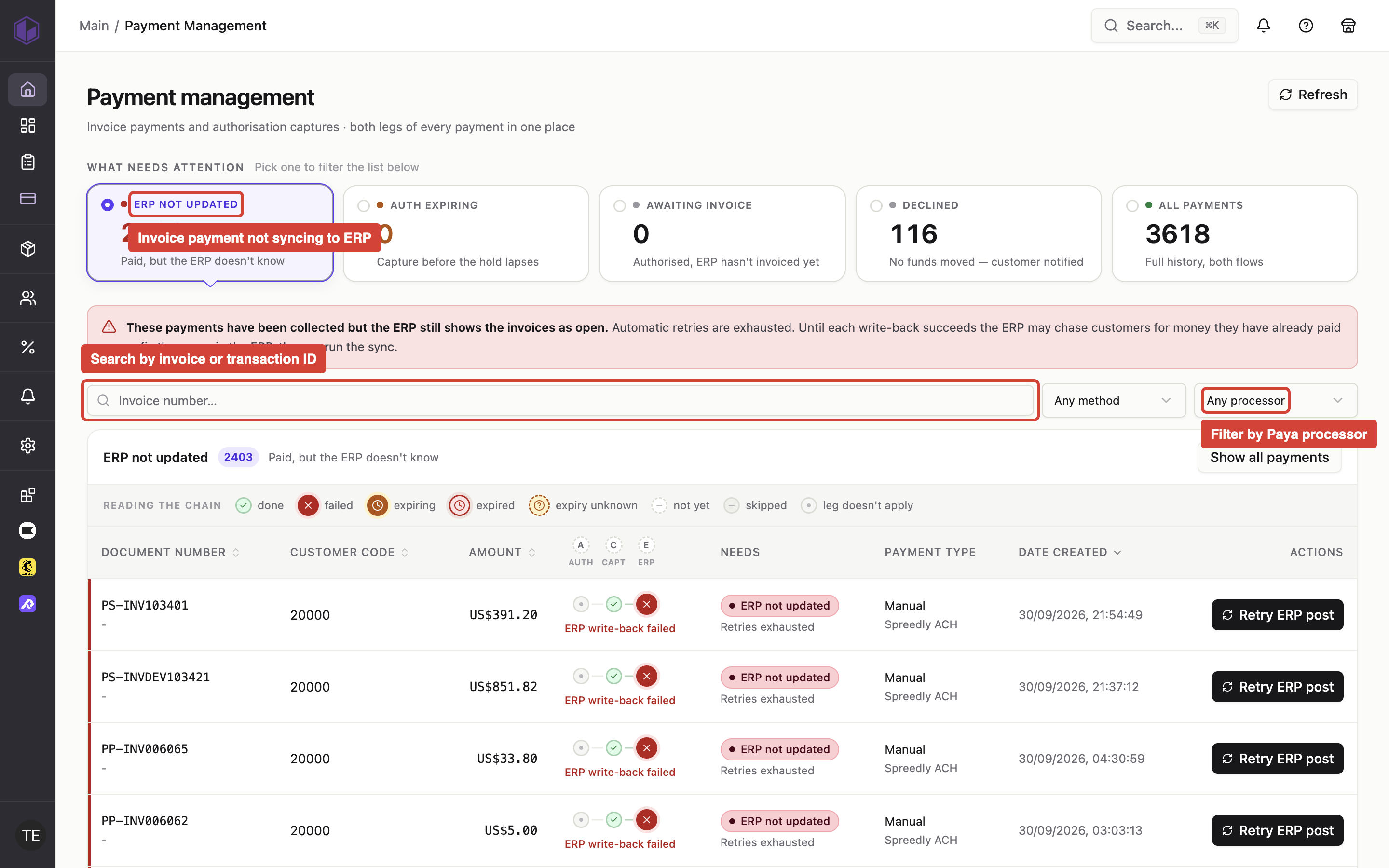
Invoice payment not syncing to ERP: When a payment is marked as unpaid in your ERP despite being processed through Paya, check that the
order_numortransaction_api_idfield is correctly populated and that your ERP integration is listening for payment confirmation webhooks or polling transaction status. -
Authentication failures: If API requests return authentication errors, verify that the
developerId,userId,timestamp, andhashKeyare all correctly configured. The hash key must be regenerated for each request using the current timestamp and your API secret. -
Transaction amount mismatches: When capturing an authorization, ensure the
transaction_amountin theauthCompletecall matches or is less than the originally authorized amount. Paya will reject captures that exceed the authorized amount. -
Blocked customers attempting payment: If your platform implements customer blocking rules, ensure that payment attempts from blocked customers are rejected before calling Paya's API to avoid creating orphaned transactions.